Zum Rails Onboarding Application
Zum can offer you such great transaction rates because it underwrites the business and provides you with your own merchant account. Because that comes with some risk, Zum will also ask for detailed business information and estimates of the volume of funds you plan to release through their platform.
To make the application process as smooth as possible, please have the following documents ready to provide them.
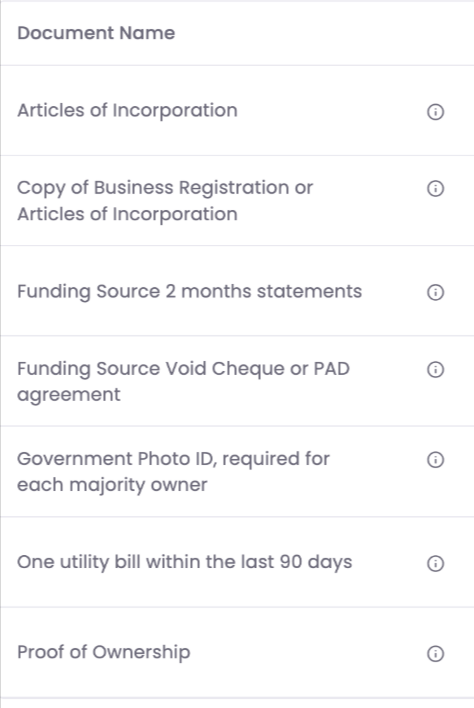
* If you have multiple bank accounts, you will need to provide them with a list of bank accounts that you intend to send money from and each of their associated bank statements.
Finally, estimate the limits you might need for each bank account before getting started. For each funding source, you will need to provide estimates on the following numbers:
* It is a good idea to look at a month of activity from your busiest month in Real Estate. If that is June every year, go take a look at those transactions to get your estimates. Remember that these limits can be adjusted, so they aren't set in stone.
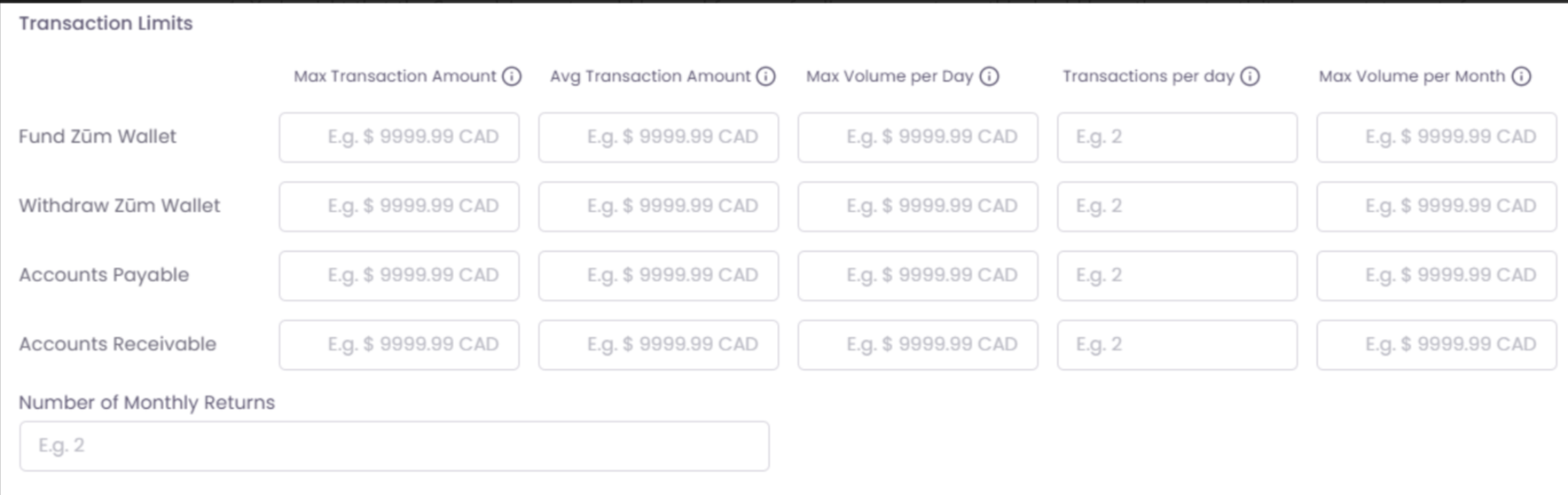
Tips to help you estimate these items:
Max transaction amount: This should be the highest commission paid out to a single Agent. e.g. $200,000
Avg transaction amount: This should be the average amount of commissions paid out. This is an estimate, so you can view Loft data or use your best guess and estimate an amount slightly higher. e.g. $10,000
Max volume/day: This would be the maximum volume from payouts you do in an average day. (This should be the number of payouts you do times the average commission amount, and add a little extra to cover you in the busy season.) e.g. $60,000
Transactions/day: The number of payments from this account on an average day. e.g. 5
Max Volume/Month: This is the maximum you will pay out in a month, take the daily maximum and multiply by 20 working days or more if you operate over the weekend. e.g. $1,200,000
To make the application process as smooth as possible, please have the following documents ready to provide them.
* If you have multiple bank accounts, you will need to provide them with a list of bank accounts that you intend to send money from and each of their associated bank statements.
Finally, estimate the limits you might need for each bank account before getting started. For each funding source, you will need to provide estimates on the following numbers:
* It is a good idea to look at a month of activity from your busiest month in Real Estate. If that is June every year, go take a look at those transactions to get your estimates. Remember that these limits can be adjusted, so they aren't set in stone.
Tips to help you estimate these items:
Max transaction amount: This should be the highest commission paid out to a single Agent. e.g. $200,000
Avg transaction amount: This should be the average amount of commissions paid out. This is an estimate, so you can view Loft data or use your best guess and estimate an amount slightly higher. e.g. $10,000
Max volume/day: This would be the maximum volume from payouts you do in an average day. (This should be the number of payouts you do times the average commission amount, and add a little extra to cover you in the busy season.) e.g. $60,000
Transactions/day: The number of payments from this account on an average day. e.g. 5
Max Volume/Month: This is the maximum you will pay out in a month, take the daily maximum and multiply by 20 working days or more if you operate over the weekend. e.g. $1,200,000