Getting Started with ZUM RAILS
Zum Rails offers an excellent alternative for paying and receiving funds. Now available for both our USA and Canadian clients!
They provide low transaction rates and a dedicated portal to expand and enhance your options for Agent billing. They offer a variety of payment and receivables rails that span from instant funds movement to allowing for 1 to 3 business days for settlement. A full breakdown of those options can be found here.
They provide low transaction rates and a dedicated portal to expand and enhance your options for Agent billing. They offer a variety of payment and receivables rails that span from instant funds movement to allowing for 1 to 3 business days for settlement. A full breakdown of those options can be found here.
Using Zum Rails with Loft47 allows you to initiate payments and deposits in Loft while offering a dedicated web portal, where you can set up repeating billing for Agents or pay and request funds from outside vendors. In your portal, you will also be able to view, report on and summarize all your payable and receivable details.
** Deposit request functionality currently pending for US customers
Sign up Process:
The sign-up process with Zum requires that your Brokerage acquire a Merchant account, which is how they keep pricing so low. Setting up Zum does take time and documentation, and takes several days to get approval, please plan accordingly.
To establish per-transaction and daily volume limits, they will ask you to provide 3 months of bank statements for your business season, or you can break down the highest commission amount you payout or receive, as well as the highest volume you tend to see in the busiest season of the year. These limits will be set per Brokerage, and you are able to update them if need be.
If you'd like to start using Zum, we will require you to email support@loft47.com with the following information to get your account started;
1. Legal name of your Brokerage
2. First and Last Name of a bank signing authority (this person will also need access to incorporation docs for the Brokerage)
3. The preferred email for the Signing authority
4. A list of all the bank accounts you'd like to send or receive funds from. You must indicate which of your bank accounts you'd like to be made the primary account, as this is the account where your fees will be billed once a month.
We'll then hand you off to a ZUM RAILS expert to assist with the set up.
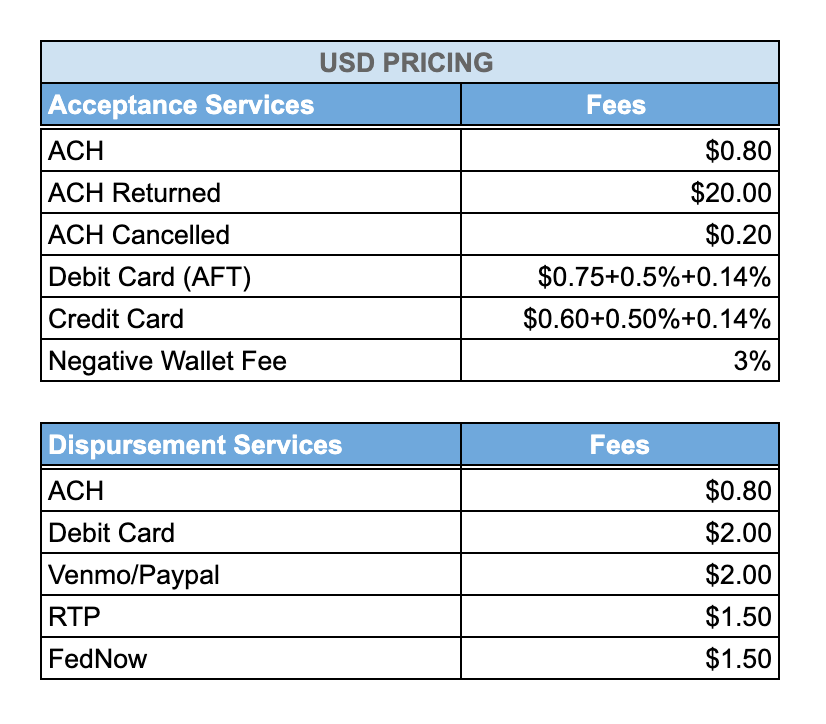
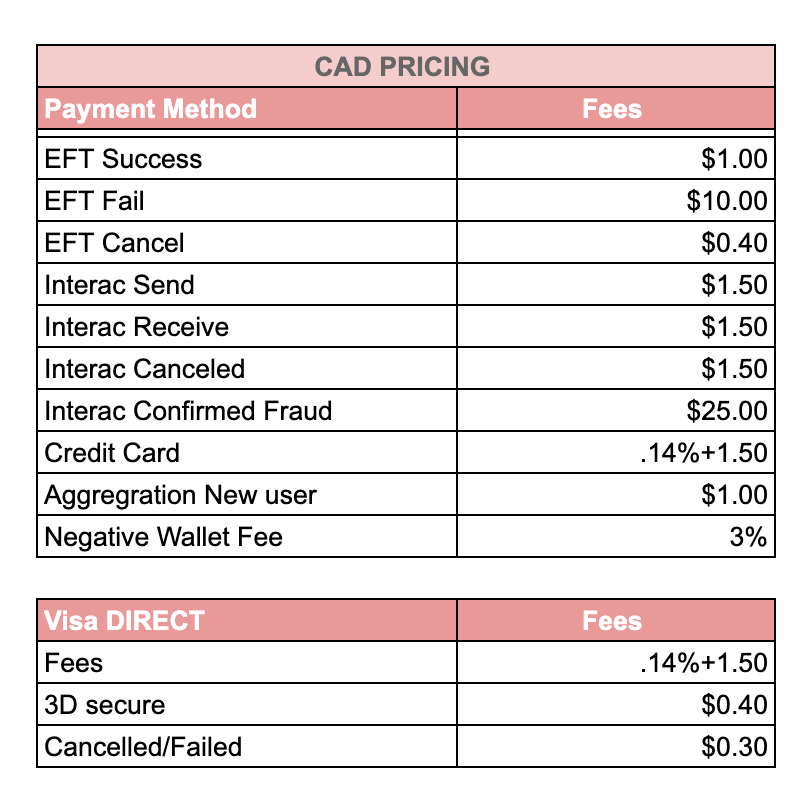
Pricing:
Services and fees are different based on the country where you operate. For more information on each Payment Method and turnaround times, please refer to Zum's overview here:
https://docs.zumrails.com/payments/payment-rails
https://docs.zumrails.com/payments/payment-rails