Agent Orientation: Quick Start
Welcome to Loft47! 👋
This quick guide will help you get familiar with Loft47, find the information you need, and create and manage your deals.
🎥 Start Here for a quick walkthrough: Basic Agent Orientation
This video covers the essentials, including:
Logging in to Loft47
Your Deal page and main navigation
Agent profile and settings
Notifications
Viewing your financial information
Performance, earnings, deductions, and T4A/1099 reports
Payload account setup
Managing and viewing deals
Deal status and comments
Commissions, Your Paystubs, and YTD statements
Deal Filters and Exports
1. Log In to Loft47
Go to https://app.loft47.com/oauth/login to log in.
Loft47 is designed to work on your computer, mobile device, and iPad, so you can access your deals wherever you are.
2. Find Your Way Around
After logging in, you'll land on your Deal page. This is your main workspace for viewing and managing your transactions.
Here are the main areas you'll use:
📋 Deals
View and manage your transactions, including deal information, documents, status, comments, and commissions.
⚙️ Profile Settings
Click your name in the top-right corner to access your Profile Settings.
Account Settings
Connect to Google Drive Integration (reports can be exported to Google Sheets)
Profile Settings: Show Deal Summary in Deals
🔔 Notifications - Set up your notification preferences and stay up to date on activity related to your deals.
💡 Tip: : Agents may continue to receive Daily Summary email notifications even if the notification is not enabled in their profile when they have pending requirements. The system sends these notifications to help ensure pending requirements are addressed.
👤 My Profile
In your profile, you can review your contact information, reporting office, tax reports, financials/YTD, overall deductions, and other agent-specific information.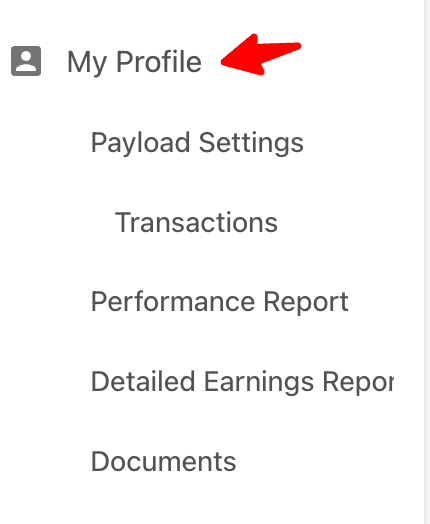
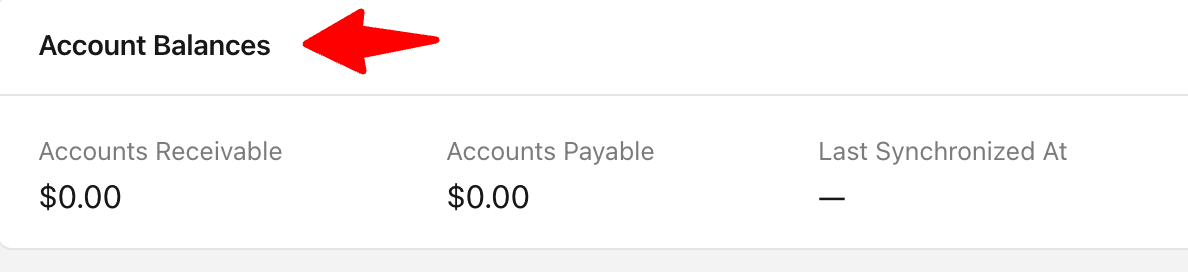
Account Balances
 Tax Returns- Download your T4A (Canada) or 1099 (U.S.) tax report.
Learn more: https://support.loft47.com/portal/en/kb/articles/agent-1099-t4a

In your profile, you can review your contact information, reporting office, tax reports, financials/YTD, overall deductions, and other agent-specific information.
Account Balances
Learn more: https://support.loft47.com/portal/en/kb/articles/agent-1099-t4a
Reporting offices & YTD financial summary
View your year-to-date financial information, including your financial summary.
Learn more: https://support.loft47.com/portal/en/kb/articles/reviewing-your-year-to-dates#Financial_Summary
📊 Performance & Reports
View your YTD information, earnings, deductions, performance reports, deal filters, and exports, depending on your brokerage setup.
Learn more: https://support.loft47.com/portal/en/kb/articles/reviewing-your-year-to-dates#Performance_Report
📊 Detailed Earnings Report
View, filter, and download your detailed earnings information.
Learn more: https://support.loft47.com/portal/en/kb/articles/reviewing-your-year-to-dates#Detailed_Earnings_Report
💳 Payload Settings If your brokerage uses Payload for agent payments, you can set up and manage your Payload account from your profile.
Learn more: https://support.loft47.com/portal/en/kb/articles/agent-how-to-set-up-payload-account
Learn more: https://support.loft47.com/portal/en/kb/articles/agent-how-to-set-up-payload-account
📄 Documents
Use the Documents section in your profile to upload and keep your broker-agent agreements and other related documents in one place.
You can add documents including:Agent license copyCommission contract / fee structureDriver’s licence informationOther documents the brokerage wants to retain for the agents.
3. Create a Deal
🤖 AI Deal Creation – Upload your accepted offer and Loft47 AI will read the document and use the information to create your deal.
🎥 Watch here: 🤖 Create a Deal Using AI — Have an accepted offer? Upload it and let AI create the deal for you.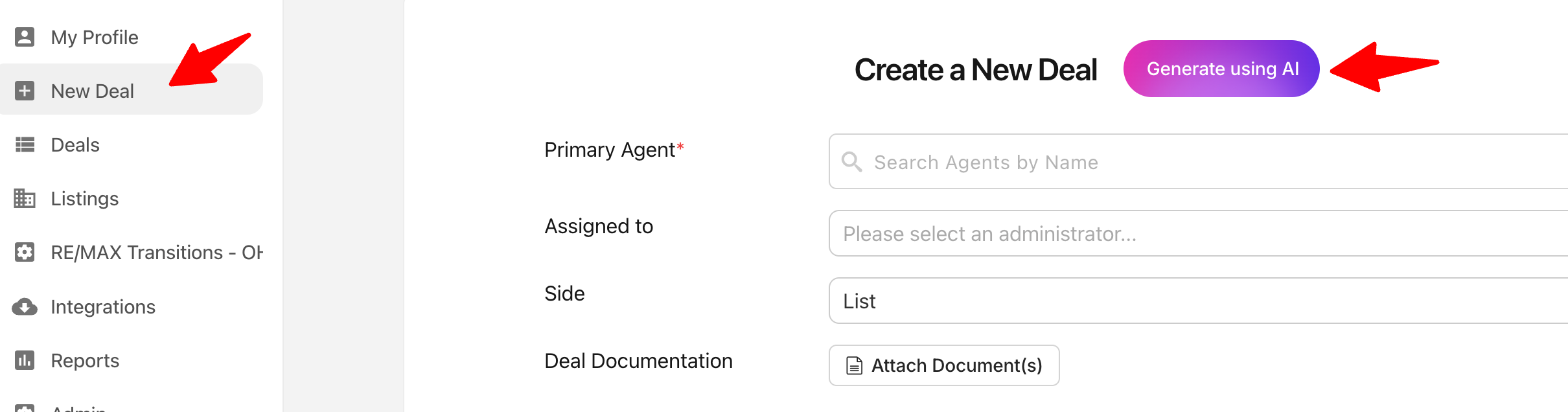
1. Go to the left-side menu and click New Deal > Generate using AI.
2. Upload your accepted offer and enter the primary agent's name.
3. Wait, Let AI extract the deal information.
4. Review the deal information created by AI.
5. Make any necessary changes.
6. Continue with your normal conveyancing deal process.
*Important: AI deal creation is currently for accepted offers only. It is not intended for lease or property management (PM) transactions.
✍️ Manual Entry - Learn how to manually create a deal: https://support.loft47.com/portal/en/kb/articles/creating-a-n
4. Create & Link a Listing
🏠 Create and manage your listings directly in Loft47.
Learn more: How to Create a Listing
Learn more: How to Create a Listing
🔗 Link Listings & Deals
You can link a Listing to a Deal and access the related transaction from the listing. Likewise, from a Deal, you can view the related Listing when one has been connected.
💡 Tip: If you're working with both a listing and a transaction for the same property, linking them helps keep the related information connected in Loft47.
💡 Tip: If you're working with both a listing and a transaction for the same property, linking them helps keep the related information connected in Loft47.
5. Manage Your Deal
You can:
- Review deal information
- Add or review documents
- Check your deal status
- View deal comments
- Review commission information
- Check your paystub and YTD pay statement
Check Your Deal Status Tags
Deal tags give you a quick view of where your transaction stands and whether something needs your attention.
You don't need to memorize every tag. If you're unsure what a status means, check the related Help Center article or contact your brokerage administrator.
The main statuses you may see as an agent include:
- Created – Your deal has been created.
- Conditional – The deal is conditional and subjects have not yet been satisfied. (Canadian brokerages)
- Firm – Subjects have been satisfied and the agreement is now fully binding.
- Needs Review / Reviewed – Your deal is in the broker review process.
- Needs Approval / Approved – Your deal is in the approval process for payout.
- Closed – Your deal has been fully processed and paid out.
-
Rejected – The deal needs attention because it does not meet the required requirements.
💡 Tip: If you see a status you're unsure about, check the deal comments or notifications, or contact your brokerage administrator.
Stay Up to Date
Deal requirements and comments keep everything related to your transaction in one place. When a comment generates a notification, you'll be alerted so you can review it and follow up as needed.
- Learn more about Deal Requirements https://support.loft47.com/portal/en/kb/articles/creating-a-n#Comments_Section
- Learn more about Comments https://support.loft47.com/portal/en/kb/articles/creating-a-n#Comments_Section
💡 Tip: Turn on comment notifications to get an email when your admin comments on your deal. You can reply directly from the deal if you've logged in to Loft47 at least once.
6. Check Your Commissions & Earnings
You can view your financial information directly in Loft47 from My Profile, your Paystub, or the available reports, including:
- Commissions
- Paystubs
- YTD pay statements
- Earnings
- Deductions
- Performance information
7. Filter & Export Your Deals
Use Deal Filters to narrow down your deal search and Export the results when needed.
8. Need Help?
If you have a question about Loft47 or a specific transaction, check the Loft47 Help Center or contact your brokerage administrator.
When contacting support, it helps to include your deal address or deal number and a screenshot of what you're seeing so we can help you faster.
You're ready to get started! 🚀
Log in → Explore your Deal page → Create your accepted offer with AI → Review your deal → Keep your transaction moving.